

Anatomy of a Market Card
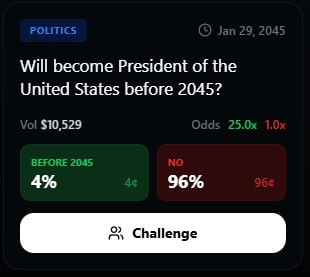
Card Components
- Header
- Outcomes
- Market Stats
Market Identification
| Element | Description |
|---|---|
| Category Icon | Visual indicator of market type (🏈 🏛️ 🎬 etc.) |
| Market Title | Clear, concise description of the event |
| Resolution Timer | Countdown or date until resolution |
| Status Badge | Open, Locked, or Resolved |
Card States
Market cards change appearance based on status:Open Market
Open Market
Active & Trading
- Full color, high contrast
- Odds updating in real-time
- All actions available
- Pulse animation on recent activity
Your Position
Your Position
You’re In This Market
- Highlighted border in your prediction color
- Your outcome emphasized
- PnL preview shown
- Quick-view of entry odds vs current
Locked
Locked
Event In Progress
- Muted colors
- “Locked” badge overlay
- Odds frozen at lock time
- Countdown to resolution
Resolved
Resolved
Outcome Determined
- Winning outcome highlighted in green
- Losing outcomes greyed out
- Final odds displayed
- PnL shown for your position
Card Interactions
Tap
Open the full market detail view to enter a prediction
Long Press
Quick actions menu: Challenge, Watch, Share
Swipe Left
Add to watchlist for later
Swipe Right
Quick challenge a friend on this market
Card Layouts
Market cards adapt to different contexts:| Context | Layout |
|---|---|
| Terminal Feed | Compact card, essential info only |
| Market Detail | Expanded view with full stats |
| Portfolio | Position-focused with PnL prominent |
| Challenge | Side-by-side with opponent’s position |
| Widget | Minimal, single-outcome display |
Visual Indicators
Odds Color Coding
| Color | Meaning |
|---|---|
| 🟢 Green | Odds moved in your favor |
| 🔴 Red | Odds moved against you |
| ⚪ White/Gray | Neutral or no position |
| 🟣 Purple | High friend activity |
| 🟡 Gold | Trending market |
Activity Indicators
| Icon | Meaning |
|---|---|
| 🔥 | Trending (high recent activity) |
| ⚡ | Fast-moving odds |
| 👥 | Friends active |
| ⚔️ | Challenge pending |
| 👁️ | On your watchlist |
| 🔔 | Notifications enabled |
Card Customization
Pro users can customize card appearance in Settings → Display.
- Compact vs expanded default view
- Show/hide specific metrics
- Color theme for positions
- Animation preferences
Related
Entering a Prediction
What happens when you tap a card
Active Positions
Managing your open predictions